1. Log in to your cPanel account.
2. In the Domains section, click on Redirects.

3. Scroll down to the end of the page. Under Current Redirects, locate the domain and click on remove. 
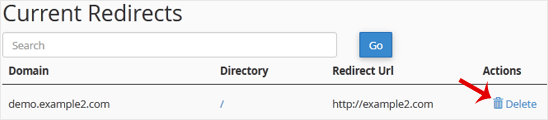
4. For confirmation, click on Remove Redirect once more. 

1. Log in to your cPanel account.
2. In the Domains section, click on Redirects.

3. Scroll down to the end of the page. Under Current Redirects, locate the domain and click on remove. 
4. For confirmation, click on Remove Redirect once more. 

Note: The domain you want to park must point to the DNS of our server.1. Log in to your cPanel...
1. Log in to your cPanel account. 2. In the Domains section, click on Aliases. 3. Under Remove...
Before adding the addon domain, point your addon domain nameservers to your primary domain...
1. Log in to your cPanel account. 2. In the Domains section, click on Addon Domains.3. Locate...
You can redirect your add-on domain to another domain.1. Log in to your cPanel account. 2. In...
Broodle offers superior, reliable and affordable Web Hosting to individuals and small businesses. We’ve designed our entire process and products around providing everything a small businesses needs when they’re starting out – ensuring that working with us is always a quick, easy and hassle-free experience.