1. Log in to your cPanel account.
2. In the Databases section, click on MySQL Databases.
![]()
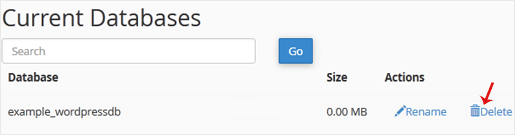
3. Under Current Databases, you can see a list of all your databases. Locate the database you want to remove and click on Delete.
4. Click on Delete Database.


1. Log in to your cPanel account.
2. In the Databases section, click on MySQL Databases.
![]()
3. Under Current Databases, you can see a list of all your databases. Locate the database you want to remove and click on Delete.
4. Click on Delete Database.
1. Log in to your cPanel account.2. In the Databases section, click on MySQL Databases. 3. In the...
1. Log in to your cPanel account. 2. In the Databases section, click on MySQL Databases. 3....
1. Log in to your cPanel account.2. In the Databases section, click on phpMyAdmin.3. From the...
1. Log in to your cPanel account.2. In the Databases section, click on phpMyAdmin. 3. From the...
Broodle offers superior, reliable and affordable Web Hosting to individuals and small businesses. We’ve designed our entire process and products around providing everything a small businesses needs when they’re starting out – ensuring that working with us is always a quick, easy and hassle-free experience.